
TrackLab 0.6.0 has been released, bringing the feature I’ve been planning the longest: Rules. It’s hard to reach your goals without a structure your routine is based on. Now you can create rules in TrackLab and track how consistently you follow them.
Rules
A rule is a new entity in your laboratory. When creating a rule, you choose which item you want to track, how many times or for how many minutes, and over what period. The form is designed to be intuitive — you can read the rule directly from its elements.
For example:
- item: Reading
- condition: At least
- value: 15 minutes
- period: A day
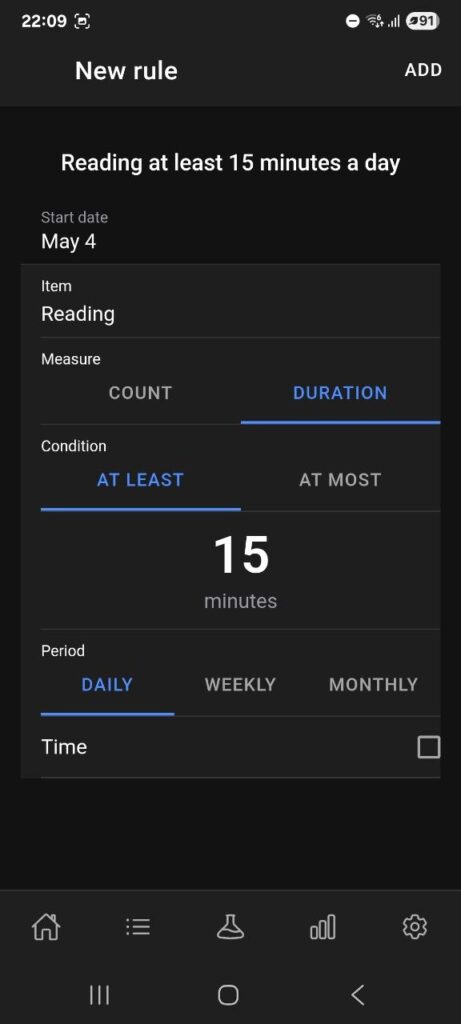
This becomes the rule “Reading at least 15 minutes a day” — clear and specific.
A rule can be linked to any item — an action, a tag, or a custom item. To forbid an item (e.g., a bad habit), set the value to 0 times or 0 minutes.
Rules statistics
To track your progress, visit the new statistics page dedicated to rules. It has a calendar where you can see which days, weeks, or months you followed each rule.
Streaks work not only on a daily basis. If your rule doesn’t need to be completed every day — for example, “run at least 3 times a week” — you can set the period to weekly, and the streak will count consecutive weeks instead of days. Monthly rules work the same way. This makes streaks meaningful for habits that don’t require daily commitment.
As metrics of your commitment, I added streaks and uptime. You’re probably familiar with streaks from apps like Duolingo.

But what is uptime? I borrowed this term from web hosting, where it measures server reliability as the ratio of operational time to total time. In TrackLab, uptime works the same way: it’s the percentage of periods in which you followed a rule out of the total time tracked.
I added both metrics because streaks alone aren’t enough. When you break a streak, motivation drops — you’ve lost your progress and have to start over. Uptime, on the other hand, can forgive a few missed periods if you’ve been consistent overall.
For example, if you miss one day after a month-long streak, your uptime drops from 100% to 96.8% — far less discouraging than losing your streak entirely. And if you keep following the rule afterward, you can bring uptime back up to 99.9%.
Don’t try to be a perfectionist — keeping your uptime above 80% is already a big deal.
Dashboard
Another feature in this update is a dashboard. As TrackLab grows, so does the number of pages — some are used much more frequently than others. The dashboard helps you navigate the app quickly and shows a list of rules you need to follow today.
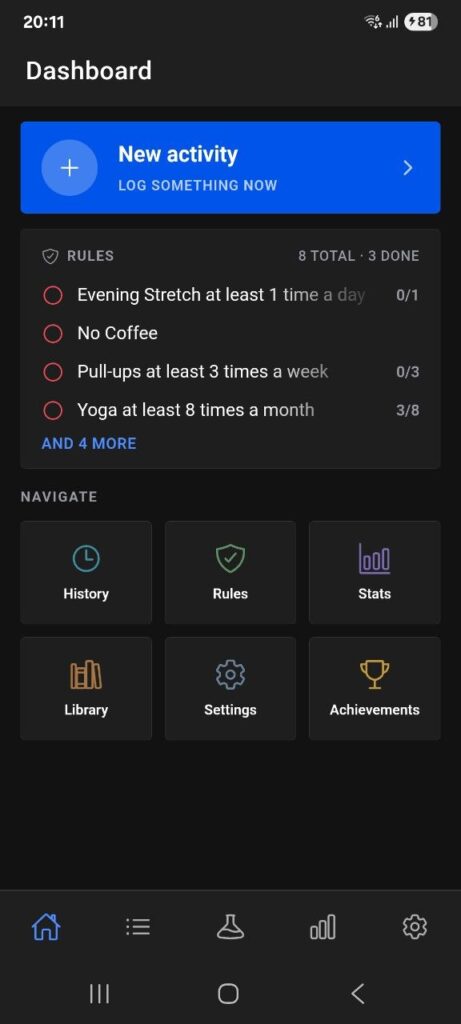
I have plans for the dashboard: in a future update, it will be fully customizable. The idea is that you’ll be able to display any graph or any links that matter to you specifically.
Calendars and Wheel Pickers
I also improved the date and time selection experience. Since this update is centered on rules, building a proper calendar component was essential. The rule statistics page uses the new calendar to show which periods you passed or failed.
The metrics statistics page has been updated as well — you can now see an average value for any metric directly in the calendar view.
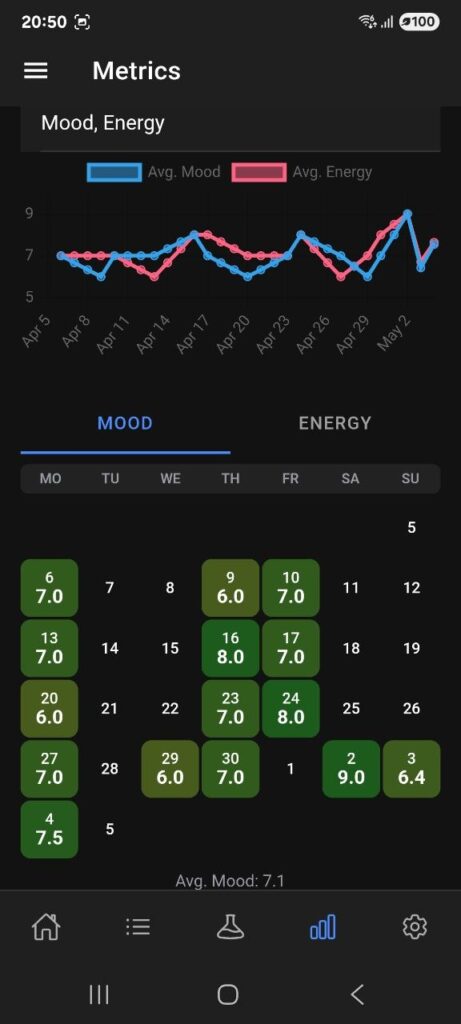
For time selection, wheel pickers are now used throughout the app. Together, these changes make logging your activity faster and more convenient.
Conclusion
The main goal of this update was to implement Rules — the building blocks of discipline. I hope this feature helps you build a consistent routine and motivates you toward meaningful changes in your life.
Beyond rules, several improvements were made to enhance the overall tracking experience. New rule-related achievements were added as well — along with the custom metrics introduced in v0.5.3, rules give you a complete toolkit for meaningful self-tracking.