

Do you like when a fresh Chrome update breaks something? I really like it because when a big multibillion-dollar corporation makes mistakes, it reminds me that nobody is perfect. Jokes aside, we have a problem to solve.
Problem
Hardcore developers use the keyboard only, but I used to perform many actions with the mouse. One of these actions is selecting the URL from the address bar. I click once to make the address bar editable and click a second time to reset the text selection. After that, I can easily select any part of the URL I need. Or at least, I could.
After updating to version 143 on Linux (Ubuntu), the address bar became unresponsive to any mouse interaction – left and right button clicks have no effect. Because of this, you can’t select part of the URL with your mouse.
Solutions
Disabling a flag
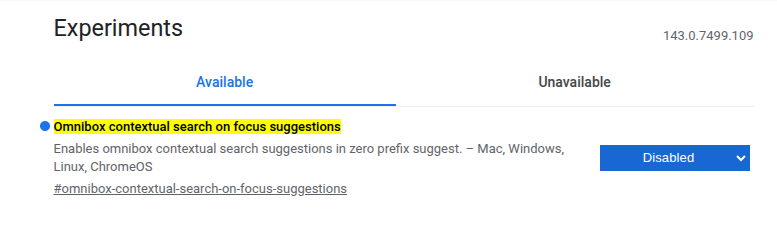
Type chrome://flags/ in the address bar, and you’ll get access to Chrome’s experimental features.
To solve the problem, you need to disable the flag “Omnibox contextual search on focus suggestions”. After reastarting the browser, the address bar should work as usual.
Make a click on the tab
This solution is not obvious. I discovered it by accident. You need to make an additional click on the tab after clicking on the address bar. The new algorithm is:
- Click to focus on the address bar
- Click the tab to make the address bar editable
- Click the address bar to reset the text selection
If it was made intentionally and the feature is supposed to work this way, it’s very stupid.
Adapt
Changes happen all the time, and it would be good to develop adaptation skill. You can still use your keyboard. It takes time to get use to a new method, but your brain will eventually create new neural connections. They say it’s a good thing.
- Ctrl + L to focus on the address bar
- Ctrl + Home to set the caret to the beginning of the URL
- Ctrl + Shift + Right Arrow to select part of the URL you need, word by word
Good feature
Except for this bug, there is a good feature in the update. I’m talking about split view. It’s really cool, and I have already used it a lot. It is much more convenient than opening separate windows.

Conclusion
When I faced the issue, I found the first solution on a page about another issue related to the flag. Fortunately, it works in my case. Now, if you have the same problem, you know how to fix it.