
I started to use TrackLab one week ago when version 0.3.2 was released. This release had backups, which are an essential feature for testing period. Before that, I made all my records in MD files starting from August 4. Here I want to share my first impressions as a user, not a developer.
Import/export feature
First of all, I imported all my records from MD files into the app to keep all history in one place. This process ran smoothly, but it was quite tedious to import all 52 files one by one. One for each date between August 4 and September 24. I don’t think anybody will ever do this again, so it’s not a big problem.
Backup feature
Next, I tested backup feature, because I didn’t want to lose all my progress. It also worked. A backup for two months takes 320 KB. Not a big deal, but I will keep an eye on the size as the database grows.
Adding activities
Then I started to track my activities, and it was much more convenient than doing it in MD-tables from laptop. Suggestions for actions make it easier to add new entries. Many actions repeat day after day.
Also, the adding form keeps all values from the last record. It helps to evaluate metrics by comparing with previous value. For example, if energy was 6, but I feel a little bit more tired than before, I can just reduce the value to 5.
Adding activities issues
I spent most of the time I used TrackLab on the adding page and found several issues. All of them are related to default values, which are supposed to make tracking easier, but something went wrong.
- End time updates only when I leave the page and then come back. And I noticed that I do it all the time – go to history page and then back to adding page. That’s why I added a button to update end time in version 0.3.3.
- Also, I notices that in some cases I don’t need to update end time. I fixed it in version 0.3.4. Now if you change end time manually it won’t be updated automatically after coming back to the page.
- I stop using laptop and smartphone after 22:30. And everything I do after that I track in the next morning. There was a problem that start time set automaticaly to the current time because it was a new date. That was fixed in 0.3.4. Now if yesterday day was unfinished, adding form will set yesterday’s day as a default date and its last activity’s end time as a default start time. Day is considered finished if its last activity was started before midnight and ended after.
Overall impression
I’m going to be totally honest with you. My first impression was not great. I was really upset that I spent over a month to develop the app and it was nothing special. It’s just a regular tracker with no interesting features.
But the main lesson from TrackLab is that everything passes. And my upset mood did too. Just look at this graph:
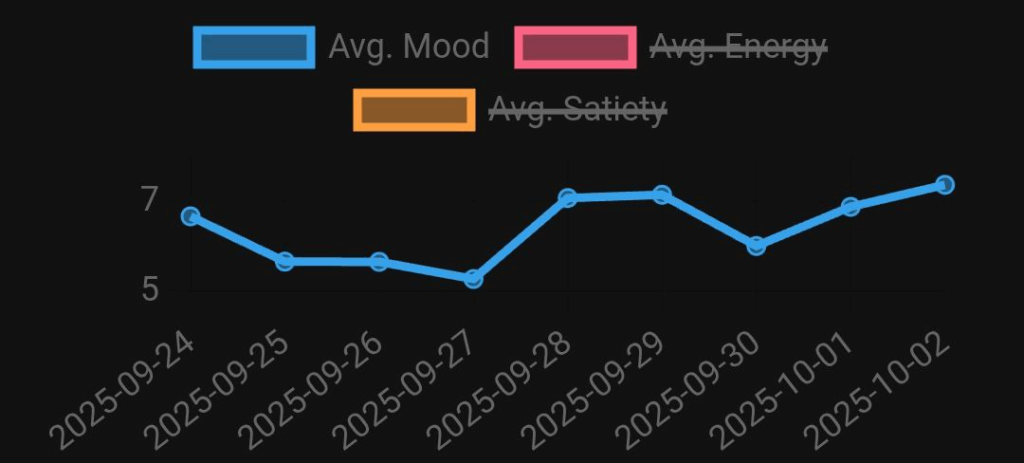
On September 25 and the following two days, my mood was lower than usual. I kept asking myself, “What’s the point? It will never work.” But then the feeling faded. I reminded myself that this is just the beginning, and each release will make the app better.
Looking at the graph, I realized: now it’s just numbers. My frustration is nothing more than data from the past. If it helped me once, maybe TrackLab really will work after all.